Smisty is free for Windows

Split payslip PDFs by employee: one single PDF becomes one file per person

Smisty is the free Windows program for splitting payslip PDFs by employee: it takes the single file produced by the payroll software (payslips, Certificazione Unica tax forms, timesheets) and separates it into one PDF per person, reading the Italian tax code (codice fiscale) or the employee number on every page. It is designed for Italian companies, firms and payroll offices; it is not a generic program that splits PDFs at fixed page counts. It was built by AraLith, a software house in the province of Rome, active since 2007.

  • Free, with no expiry: up to 15 payslips and 1 PDF per run, no account, no watermark.
  • OCR included: it also reads scanned PDFs, on your computer.
  • No upload: payslips never leave your PC.
  • Smisty Pro at €75 per year when you need more payslips, more PDFs or more companies.

Leave your email in the form and you will receive the download link.

Free download for Windows

Download Smisty

Leave your email address and you will immediately receive the link to download the program. No registration, no subscription.

Smisty in four points

At a glance

  • Split a PDF into multiple files, one per employee: a page goes to a person only if their valid tax code or employee number is in the reading area.
  • Ready-made file name: the name printed on the payslip (e.g. ROSSI_MARIO.pdf), with a CSV report and a ZIP.
  • Uncertain pages never assigned at random: a «to review» folder, preview and manual assignment.
  • Everything on your computer: files never leave your PC, no upload, no artificial intelligence, originals untouched.
Smisty cover, the Windows program that splits payslip PDFs into one file per employee

Why is sorting a payslip PDF by hand a risk, not just a waste of time?

Sorting a payslip PDF by hand is a risk because every page has to be separated, renamed and matched to the right employee, and a single mistake is enough to hand a payslip to the wrong person. The payroll software, or the payroll consultant, delivers one PDF with all the month's payslips: whoever works in the payroll office opens it, selects the pages, saves one file at a time and hopes not to get a recipient wrong.

With ten employees it is a nuisance, with a hundred it is a morning a month, and the real cost is not the time: it is a payslip sent to a colleague. Smisty removes the manual work and reduces the risk: an uncertain page is never assigned at random, you decide it.

«The payroll system gives me a 300-page PDF»

The typical situation in a payroll office

A single file from the payroll software, one payslip per page or across two pages, the employer's tax code on every sheet, a summary report at the end. To be split by employee, renamed and filed, every month, before handing it out.

What does Smisty do when you need to split a payslip PDF into multiple files?

  • Reads the tax code or employee number on every page

    Smisty reads, on every page of the PDF, the areas you have marked: tax code or employee number, name and date. A tax code must pass the check-character test: a misread code is discarded, never «fixed».

  • No list to prepare

    On the first payslip you drag the mouse around where the tax code (or employee number), the name and the date are: the same positions apply to every page and you save them as a company for the following months.

  • One PDF per person, with the right name

    Each employee's pages, even across several pages or in different parts of the file, are merged in their original order into a PDF named after the person printed on the payslip (e.g. ROSSI_MARIO.pdf). Payslips, multi-page Certificazione Unica forms, timesheets: the rule is the same.

  • You decide the uncertain pages

    A page with no tax code or employee number in the area, or a scan the OCR cannot read? It is never assigned by trial and error: you see it in the preview with its thumbnail, open it full screen and choose the person yourself, or leave it in the da_verificare (to review) folder.

  • Everything on your computer, originals untouched

    Payslips never leave your PC: no upload, no cloud service, no artificial intelligence; the OCR also works locally. Source files are only read; the output goes into a dated subfolder that you can delete and redo.

  • Report, ZIP and Windows installer

    When the job is done you find a CSV report with people, pages and generated files, and a ZIP of everything if you want one. Installer for 64-bit Windows 10 and 11, with no administrator rights needed, or a portable zip. Interface in Italian and English.

Tax code and reading areas

How does Smisty avoid assigning a page to the wrong employee?

Smisty assigns a page to a person only when it finds a valid tax code in the reading area or, if the payslip prints only that, the employee number: it doesn't compare names and it doesn't guess.

You draw the areas on the first payslip, around the value alone: that is how the employer's or consultant's code, printed elsewhere on the same page, stays out of the reading.

Every tax code must pass the check-character test; if the area contains neither a valid code nor an employee number, or the page is an unreadable scan, the page goes among those «to review» and you decide it from the preview, with the thumbnail and the full-screen viewer.

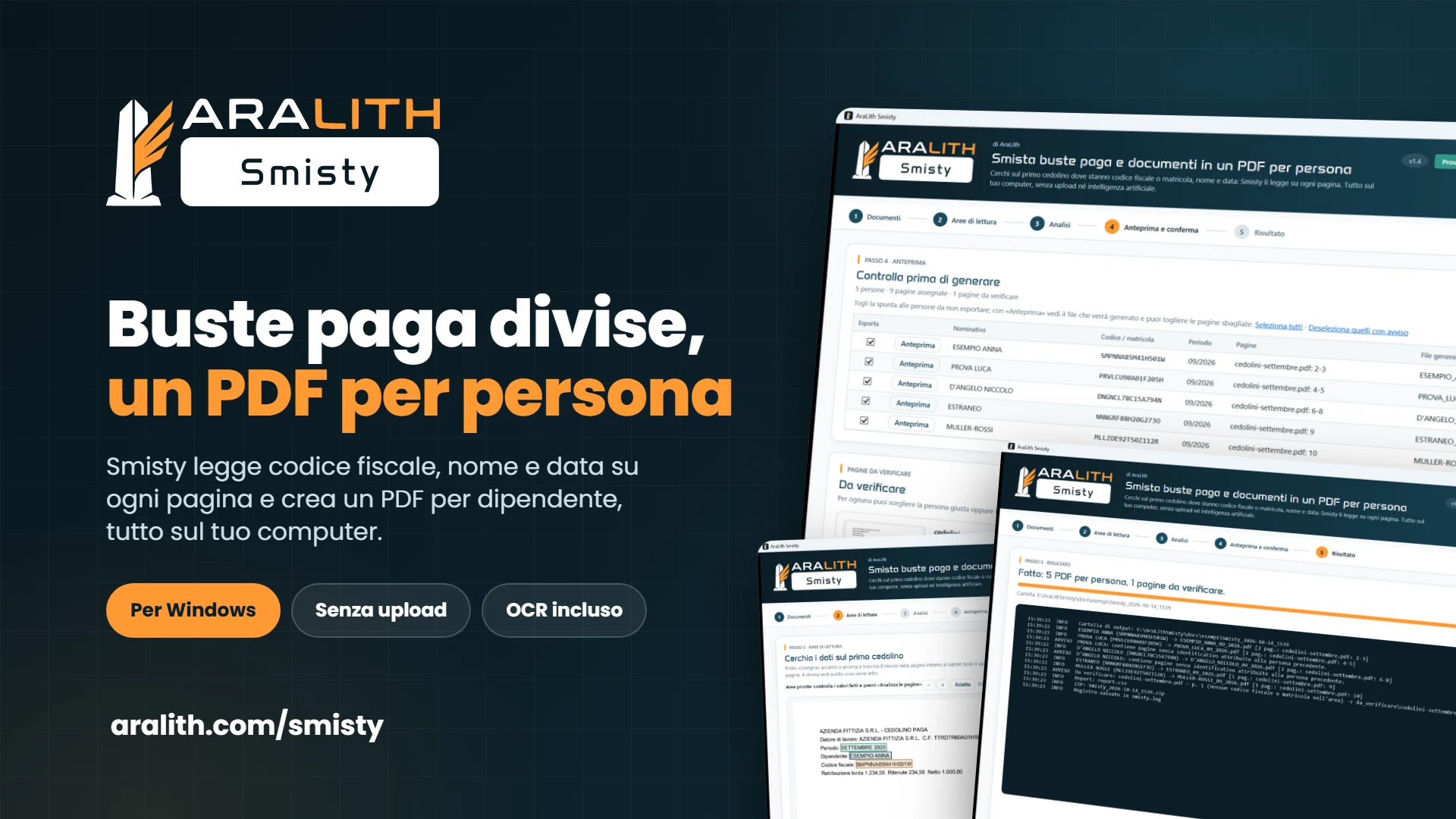
Illustration of a dotted path with three numbered stops leading to a flag with a tick

It also works when

  • The payslip takes up two pages

    If the tax code is on both, the pages are merged automatically. If it is only on the first, the option «pages without a code belong to the previous person» assigns them and highlights them in the preview.

  • Certificazione Unica across several pages

    Consecutive pages of the same person form a single PDF; the withholding agent's code, outside the reading area, is not taken into account.

  • The employer's code is on every page

    Smisty reads only the area you drew: the code of the employer, consultant or firm printed elsewhere on the page is ignored.

  • The payslip prints only the employee number

    Tax code and employee number sit in the same area: if there is a valid tax code it takes precedence, otherwise the employee number applies.

  • The PDF is a scan

    With OCR, on by default in every version including the free one, Smisty reads the areas on pages without text, on your computer. A misread code fails the check and the page stays to be reviewed.

  • Different payroll software

    The areas are drawn on your payslip layout and saved as a company. Two different layouts, for example from two payroll programs, are processed separately, as two companies.

How do you split a payslip PDF into one file per employee in four steps?

01

Load the PDF

Step 1

Drag the PDF into the window just as it comes out of the payroll software and check the output folder (by default, the PDF's folder). If you have already saved a company, choose it from the menu: its areas apply straight away and you skip the next step.

02

Draw the reading areas

Step 2

On the first payslip you drag the mouse around the tax code or employee number, the first and last name and, if you like, the date. On the right you immediately see what is being read; the same positions apply to every page. For payslips across several pages there is the option «pages without a code belong to the previous person», and for scans there is OCR.

03

Check the preview

Step 3

Smisty reads the areas on every page in a few seconds. The table shows, for each person, name, code, period, the pages found and the name of the file that will be created. Pages to review have a thumbnail, the reason and a menu to assign them by hand; one click opens the page full screen.

04

Generate the files

Step 4

Only after your confirmation does Smisty write, into a dated subfolder, one PDF per person (e.g. ROSSI_MARIO.pdf), the da_verificare (to review) folder with the unassigned pages, the CSV report and, if requested, the ZIP. The originals are never touched.

Splitting payslip PDFs by employee with Smisty takes four steps: you load the PDF, draw the reading areas on the first payslip, check the preview and assign the uncertain pages by hand, then generate the files. It works for monthly payslips as well as for employees' Certificazione Unica PDFs: one PDF per person with the right name, doubtful pages in a separate folder, originals untouched.

Who made it

Who built Smisty and why is it free?

Smisty was born at AraLith, a software house in the province of Rome active since 2007, as the second tool in the desktop family after ReBrandy for editing multiple Word files at once. The problem is that of anyone who receives a single PDF with all the payslips from their consultant every month and has to give one to each employee: splitting it by hand takes time, and one mistake sends a payslip to the wrong person.

That is why Smisty never guesses: a page goes to a person only if the reading area contains a valid tax code or their employee number, and you decide everything else in the preview. We apply the same method to our clients' projects: when a process relies on manual steps, we build the software around the real process. If you need a feature Smisty doesn't have, you can ask AraLith for custom development.

Illustration of a developer at a desk in front of code and a colleague with a tablet, with PHP, SQL and API tabs
  • Since 2007, our own products

    AraLith develops and maintains its own platforms, including AraLith COS and OreFattura, as well as custom software for businesses across Italy.

  • Payslips stay on your PC

    Smisty works locally and its engine has no network components: no file uploaded, no account, no error reports sent outside. The only data we ask for is your email, to send you the link.

  • Need more? Smisty Pro

    Unlimited payslips and PDFs, even a whole folder, as many companies as you want, customisable file names and a processing log: Smisty Pro costs €75 per year, with the license sent by email after payment.

What does the free version do and what does Smisty Pro add?

Free version

The one you download from this page, with no expiry

  • One PDF per run, up to 15 payslips, with reading areas drawn on the first payslip (tax code or employee number, name, date) and OCR for scans
  • Preview, full-screen viewer and manual assignment of uncertain pages
  • One PDF per person named after them, da_verificare (to review) folder, CSV report and ZIP
  • One saved company with its reading areas
  • Everything local, no account, no watermark on documents
  • Installer or portable zip for Windows 10 and 11, interface in Italian and English

Smisty Pro: €75 per year

Annual subscription with PayPal, license and invoice by email within minutes

  • Unlimited payslips and PDFs, even a whole folder in a single run
  • Customisable file names with name, tax code, employee number, month and year
  • As many companies as you want, each with its own reading areas
  • Processing log
  • License verified on your computer, with no connection; when it expires Smisty goes back to free without losing anything
  • Price excluding VAT

Frequently asked questions about Smisty

With Smisty you load the PDF, draw on the first payslip the areas for the tax code or employee number, the name and the date, check the preview and confirm: you get one PDF per person, already renamed after them. Pages the program is not sure about go into a da_verificare (to review) folder, never to a random employee.

The free version of Smisty has no cost, expiry, subscription, account or watermark on the generated PDFs, and works for up to 15 payslips and 1 PDF per run. We only ask for an email address to send the download link to, with your consent, and you can ask for it to be deleted at any time. To remove the limits there is Smisty Pro at €75 per year.

A PC with 64-bit Windows 10 or 11: the installer installs into your user folder with no administrator rights and includes everything needed. On first launch Windows SmartScreen may show «Windows protected your PC»: choose «More info» and then «Run anyway».

The reading areas are the positions you mark with the mouse on the first payslip: tax code or employee number, first and last name and, if you like, the date. Smisty reads those positions on every page, so there is no need to prepare a list of employees, and the employer's or consultant's code printed elsewhere stays out. By saving the areas as a company, you skip this step the following month.

Smisty works with any payroll software that always prints the employee's tax code or employee number in the same position on the payslip: the areas drawn on the first page apply to all the others. If your payroll system prints the code only on the first page of each payslip, there is a dedicated option for the following pages; two different payslip layouts are processed separately.

If the tax code appears on both, Smisty merges the two pages into the same PDF. If it appears only on the first, the option «pages without a code belong to the previous person», on by default, comes into play: the second page follows the first and stays highlighted in the preview, so you can check it.

No: payslips are processed only on your computer and are never sent to AraLith or to third parties. The program's engine has no network components: no upload, no cloud service, no artificial intelligence, no error reports sent outside; the OCR also works locally. The original files are only read.

Smisty also works with scanned PDFs: OCR is included in every version, including the free one, and is on by default. On pages without text it reads only the reading areas, on your computer. Skewed, blurred or low-resolution scans may not yield a valid code: in that case the page stays among those to review and you assign it by hand from the preview.

Yes: the rule is the same for any document with the employee's tax code or employee number always in the same position. Consecutive pages of the same person form a single PDF; if a person appears in different parts of the file, the pages are merged in their original order and the preview flags it.

Smisty does not send emails, in any version: it prepares one PDF per person, already renamed after them, to attach to the message with your email program. When processing is done you also find the CSV report with people, pages and generated files and, if you ask for it, a ZIP with all the files.

Smisty is designed for Italian companies, firms and payroll offices: it recognises the Italian tax code, with its check character, and month names in Italian and English. With identifiers from other countries the only option is the employee number, if the payslip prints it.

The free version of Smisty processes up to 15 payslips and 1 PDF at a time, saves 1 company and gives files the fixed name of the person; it has no input folder and no processing log. OCR for scanned PDFs is included. When you exceed a limit the app tells you and the work done is kept. To remove the limits, upgrade to Smisty Pro, €75 per year: unlimited payslips, PDFs and companies, customisable file names and a log.

Split payslip PDFs by employee with Smisty

Leave your email in the form at the top of the page: you will receive the link to download Smisty, free for Windows. When you need more payslips, more PDFs or more companies, upgrade to Smisty Pro: €75 per year, with the license sent by email right after payment.

Content created with the support of artificial intelligence.