01
Choose the documents folder
Step 1
Open ReBrandy, press Browse or drag a folder into the window: all the .docx files in the folder appear (not those in subfolders). Tick the ones to process or select all.

ReBrandy is the free Windows program for editing multiple Word files at once: find and replace in multiple Word documents and change the logo in all your Word documents in one go. It is meant for rebranding documents after a change of company name or company logo. It was built by AraLith, a software house in the province of Rome, active since 2007, for its own rebranding work, and we make it available as it is.
Leave your email in the form and you will receive the download link.
ReBrandy

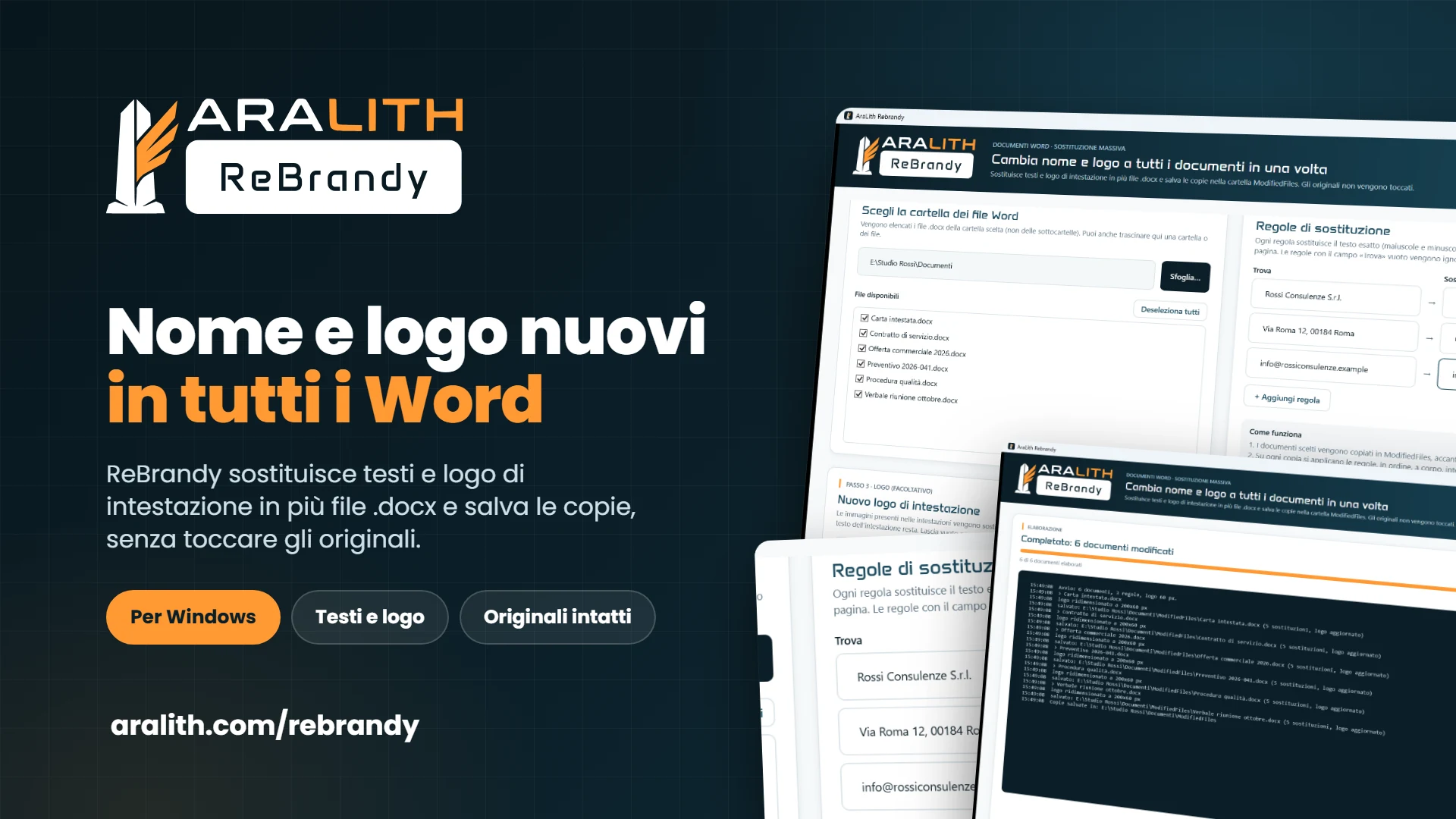
Choose a folder, tick the .docx documents, enter the «find → replace with» pairs: company name, product name, address, VAT number. The rules are applied in order to all selected files: one bulk edit instead of opening a hundred documents.
Replacement covers the document text, headers and footers. If Word has split a sentence into several formatting runs, ReBrandy joins them and replaces it anyway.
You choose a PNG and a height in pixels: the new logo takes the place of the images in the header, with the width calculated proportionally. The header text stays as it is: that way the letterhead changes across all documents without opening them one by one.
Each document is copied into the ModifiedFiles folder, next to the source files, and only the copy is edited on your PC. If you don't like the result, you delete the folder and start again.
When the job is done you see, document by document, how many replacements were made, whether the logo was updated and any errors. A button opens the folder of modified files.
An executable for 64-bit Windows 10 and 11 of about 6 MB, launched with a double click. It needs Microsoft's free .NET 8 Desktop runtime. No account, no documents sent over the internet. Interface in Italian, English, French, German and Spanish.
Step 1
Open ReBrandy, press Browse or drag a folder into the window: all the .docx files in the folder appear (not those in subfolders). Tick the ones to process or select all.
Step 2
Each rule is a «find → replace with» pair, for example Rossi Consulting Srl → Nuova Vega Srl. Matching is exact: upper and lower case count. You can add as many rules as you like.
Step 3
Choose a PNG and the height in pixels at which it should appear in the header. If you leave it empty, headers are not touched.
Step 4
Run the replacement on a single document, open the copy in ModifiedFiles and check the position and size of the logo. If it isn't right, change the height and repeat the test until the proportions are correct.
Step 5
Select all files and press Start replacement. The log shows, for each document, the number of replacements and the outcome; a button opens the folder with the modified copies.
Changing the header and text in multiple Word documents with ReBrandy takes five steps: choose the folder, write the replacement rules, choose the new logo, test on a single file and then run the replacement on all documents. The modified copies go into the ModifiedFiles folder, and the originals stay untouched.
ReBrandy was born at AraLith, a software house in the province of Rome active since 2007, out of an internal need: changing name and logo in dozens of contracts, offers and procedures without opening them one by one. We cleaned it up and make it available free of charge, as it is.
We apply the same method to our clients' projects: when a process relies on shared spreadsheets and manual steps, we build the software around the real process. If you need a specific tool or a feature ReBrandy doesn't have, you can ask AraLith for custom development.
AraLith develops and maintains its own platforms, including AraLith COS and OreFattura, as well as custom software for businesses across Italy.
ReBrandy works locally: no file is uploaded anywhere, no account to create. The only data we ask for is your email, to send you the link.
Replacements with complex rules, other formats, integration with your management software: tell us about the process and we will tell you what it takes to build it.
Yes. ReBrandy is an internal AraLith tool made available at no cost, with no subscription and no account. We only ask for an email address to send the download link to, with your consent: you can ask for it to be deleted at any time.
A PC with 64-bit Windows 10 or 11 and Microsoft's free .NET 8 Desktop runtime: if it is missing, Windows offers to download it on first launch. The program is a single executable file of about 6 MB, with no installation, and an interface in Italian, English, French, German and Spanish.
No. ReBrandy copies each document into the ModifiedFiles folder, next to the source files, and edits only the copy. If you don't like the result, you delete the folder and repeat with different rules or a different logo. Processing happens locally: the files never leave your computer.
Only Word files in .docx format. Text replacements apply to the body, headers and footers; the logo replaces the images in the headers. It does not handle .doc, PDF, text boxes or text inside images.
To split a PDF into one file per person, such as payslips, there is Smisty.
Yes: ReBrandy lets you change the logo in all the Word documents in a folder at once. You choose the PNG and the height in pixels: the images in the headers are replaced by the new logo and the header text stays in place. The copies with the new logo go into the ModifiedFiles folder.
To change the header in multiple Word documents with ReBrandy, put the files in a folder, enter the replacement rules for the header text and, if needed, the new logo, then start. The program applies the same changes to the headers of all selected documents, without opening them one by one.
Yes. Updating the letterhead on all documents is the typical case: company name, address and VAT number in headers and footers are updated with the replacement rules, the logo with the PNG. A single pass for the whole folder, with the log showing how many replacements were made in each file.
Yes, that is the case it was built for. After a change of company name or company logo, updating your paperwork means dozens of contracts, offers, letters and procedures: with ReBrandy you set the rules and the new logo once and apply them to all the Word documents in the folder in a single pass.
Run a test on a single file: choose the PNG and a height in pixels (for example 60), start, open the copy and look at the header. If the logo is too big or too small, change the height and repeat until the proportions are right, then run it on all documents.
Contact us. AraLith has been developing custom software since 2007: replacements with complex rules, other formats, processing connected to your management software. Tell us about the process and we will tell you what it takes to build it, with time and costs before we start.
Leave your email in the form at the top of the page: you will receive the link to download ReBrandy, free for Windows.
Content created with the support of artificial intelligence.
